Dear (Company Employee):
You are required to take several key training courses as part of your employment at (company). These trainings are XXXXXXX and XXXXXX. To access these trainings, please go to the following URL: http:// [Desired Training Group URL]
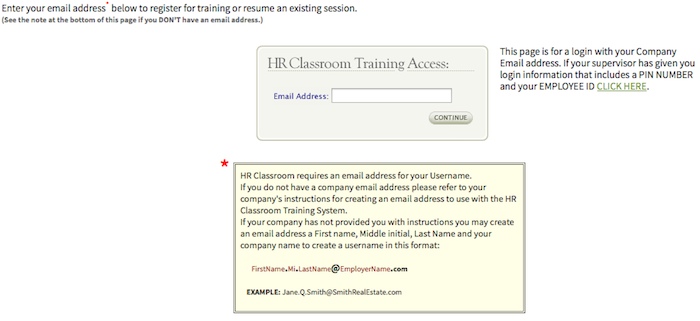
When you click the link, you will be taken to the HR Classroom training website and asked for your email address (if you do not have an email address, you should make one up, following this format: [email protected]).
HR Classroom will look to see if you’ve taken a training previously. If not, it will ask you to create a personal account.
You will need to enter:
- first name
- last name
- email address
You will also be asked to create a password and then confirm it. You must type the password EXACTLY the same each time (using the same letters, uppercase or lowercase, etc.).
Once you’ve created your account, you will then be given a list of trainings to take. Click the training title and take the training. If you are interrupted, you can always pick up where you leave off by clicking the link above, then entering your email and password again. Use the ‘Previous’ and ‘Next’ buttons to navigate through each training. Do NOT use your browser’s back button!
Please finish your trainings by (particular date).
Example Training Group Login Screen Below: